Breathedge 2 Map Guide: How the In-Game Map and Markers Work
Breathedge 2 has a hand-drawn in-game map with quest and oxygen markers. What the official map UI shows, what the Early Access build confirms, and why we publish no fake coordinates.
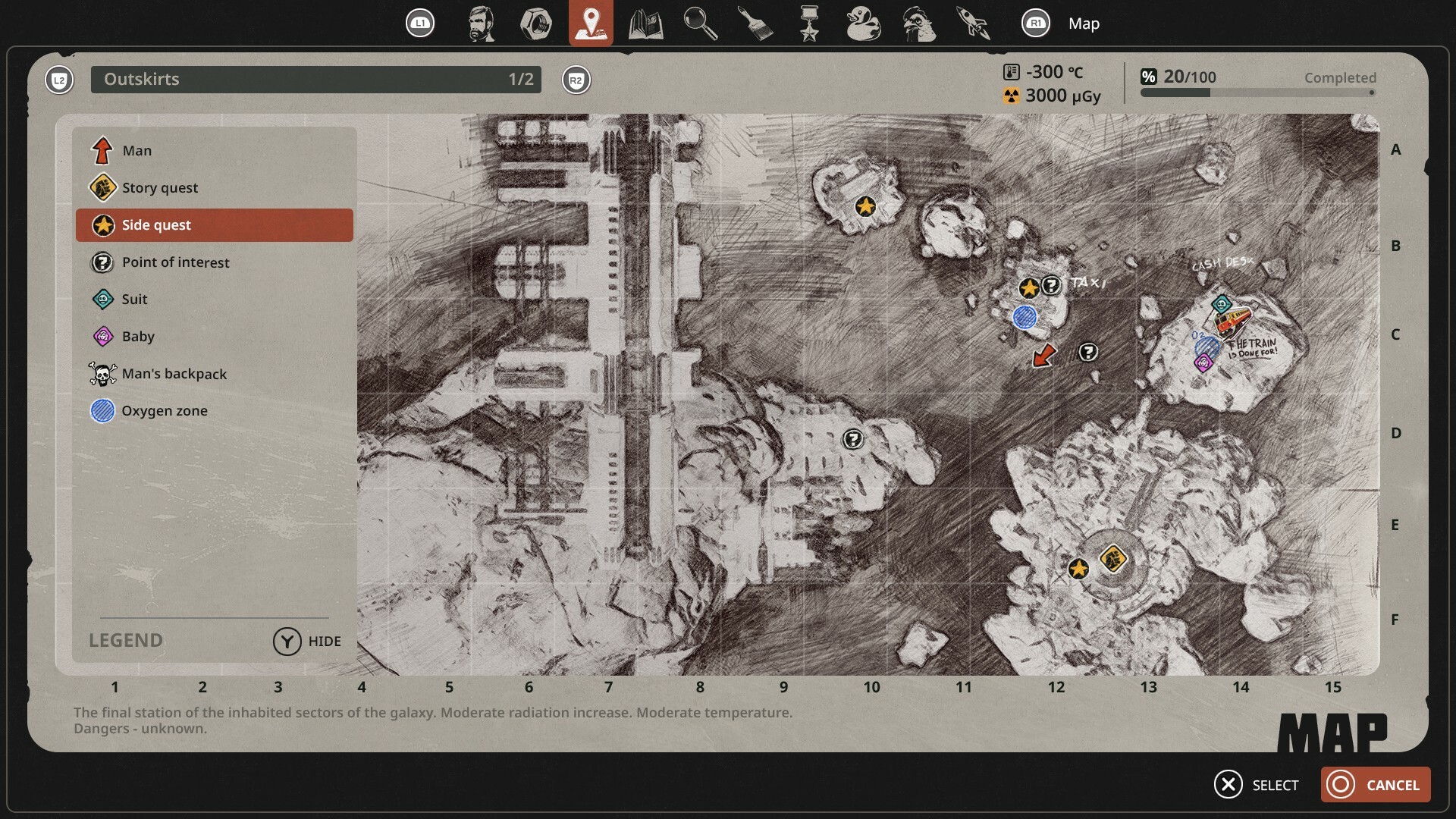
The number one navigation question about Breathedge 2 — does it actually have a map this time — has a short answer: yes. Breathedge 2 ships with an in-game map that the Man draws himself, and the Early Access build uses quest markers heavily enough that the first three weeks of hotfixes had to fix marker behavior four times. The longer answer is about what the map shows, what its icons mean, and why this page deliberately contains no coordinate database yet.
What the map is
The developer has shown the map UI in official development material: a hand-drawn style map that fills in with notes and sketches as you progress, designed to make quest markers easier to handle. It is part of the confirmed feature set for Early Access — the game’s official description lists quests and exploration among its core systems, and current-build patch notes reference map markers directly.
What the official map legend shows
The official map screenshot includes a legend with these marker types:
- the Man (you)
- story quest
- side quest
- point of interest
- suit
- “Baby”
- the Man’s backpack
- oxygen zone
It also shows a letter/number grid around the map edge — the framework for location references. Because that screenshot is development material, treat icon names and layout as official-but-pre-launch evidence: the shipped build may render details differently, and we have not yet captured a verified current-build legend screenshot. Current legend behavior in the live build: to be confirmed.
What the Early Access build confirms about markers
You do not have to take the map on faith: the official hotfix notes from the first three weeks of Early Access reference marker-driven quest behavior directly, which confirms the marker system is live and load-bearing:
- Hotfix 0.8.6 reworked the hatch battery quest so that any battery from any location counts — before the fix you had to break the ice near the hatch specifically.
- Hotfix 0.8.6 also fixed ice-breaking quest stages (knocking ice off the 10g antenna, and ice on the station door) so progress counts reliably.
- Hotfix 0.8.7 fixed the “Debug Pornhubble” task, whose marker was missing until the grate was cut — exactly the kind of marker bug that matters when a game asks you to navigate open space by markers.
- Hotfix 0.8.9 fixed a story marker that was not placed on a character after a scripted event — marker reliability is still on the developer’s list.
- Hotfix 0.8.10 reworked the mud statue to show three markers instead of one (each one clearing as a part is finished) and pointed the mud ball’s trajectory line at the sculpture’s center instead of its head — marker placement, not just marker presence, is still being tuned.
- Hotfix 0.8.7 also clarified a navigation-adjacent report: the taxi alphabet letters are scattered within roughly a 20-meter radius by design, not in one pile — and that radius is bigger than in the demo. When a task marker points at a general area, the objects may be spread around it.
That last one is the practical lesson for reading the Breathedge 2 map in the current build: a marker often marks a search area, not a single point. If nothing is exactly on the marker, sweep the surrounding area before assuming the quest is bugged — and check the patch notes tracker first, because the first week of fixes resolved several reported-as-broken tasks that were actually fine.
Why there is no fake interactive map here
A useful interactive map needs verified coordinates and verified objects. We do not yet have a trustworthy, independently checkable database of launch-build resource points, blueprint locations, NPCs, collectibles or quest coordinates. Filling a map with guessed points would look impressive for about five minutes and then waste everyone’s time — and this site does not publish invented locations, ever.
Planned interactive map layers
Once locations are verified in the current build, the map data structure is ready for these layers:
- oxygen zones / refill points
- resources
- blueprints
- repairable machines
- main quests
- side quests
- NPCs
- robots and enemies
- collectibles
- hidden / optional locations
- hazard zones
If you are charting the world yourself and can back a location with a screenshot or a reproducible route, that is exactly the evidence we want before adding a marker. Until then, the honest state of the art is: use the in-game map, trust the quest markers, know that task objects can be scattered around the marker, and check patch notes before reporting a bug.